My buddy called me one evening, frustrated and overwhelmed. He had the cash ready for a new gaming rig but couldn't move forward because of one question he couldn't shake: AMD or Intel? The AMD Ryzen vs Intel gaming debate is one of the most consequential decisions you'll make for your PC build — and it has real implications for your framerates, upgrade path, and gaming experience for years to come. If you're serious about the video games side of things, getting this right matters more than almost any other component choice.
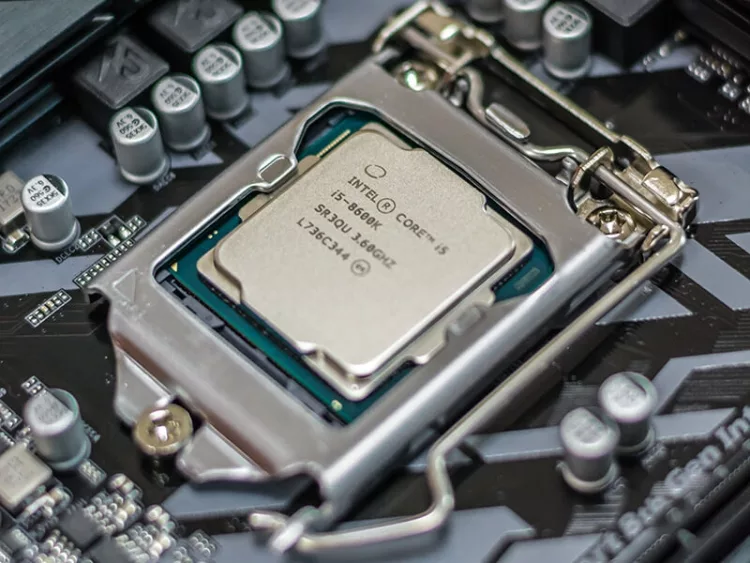
Both brands deliver strong gaming performance. That much is settled. The real question is which one makes more sense for your specific setup, budget, and gaming habits. AMD Ryzen processors have dominated the value conversation for years, while Intel has consistently held advantages in single-threaded performance — which is exactly what many games still rely on most. Neither narrative is complete without context.
This guide cuts through the marketing noise. You'll walk away knowing exactly which CPU brand fits your gaming setup, your habits, and your wallet — and you'll have the knowledge to maintain and optimize whatever you pick for the long haul.
Contents
- AMD Ryzen vs Intel Gaming: Matching Your CPU to Your Game Library
- Casual Gamer or Hardcore Enthusiast: Picking the Right Performance Tier
- Building Around Your CPU for Maximum Gaming Performance
- CPU Shopping Mistakes That Wreck Your Gaming Budget
- Fast Wins That Squeeze More Performance from Your Current Setup
- Diagnosing CPU Bottlenecks and Performance Drops
- Keeping Your CPU Running Strong for the Long Haul
AMD Ryzen vs Intel Gaming: Matching Your CPU to Your Game Library
The AMD Ryzen vs Intel gaming conversation starts with one simple truth: games don't all stress CPUs the same way. Some titles lean hard on single-core performance. Others spread work across multiple cores. Knowing which category your game library falls into is the most efficient way to narrow your CPU choice before you spend a dollar.
CPU-Intensive Games and What They Demand
Open-world games, real-time strategy titles, and physics-heavy simulations stress the CPU far more than a linear shooter does. Games like Microsoft Flight Simulator, Cities: Skylines, and demanding action RPGs push CPU utilization to its limits. These titles benefit from both strong single-thread performance and healthy core counts for handling background calculations simultaneously.
Fast-paced competitive shooters — Counter-Strike, Valorant, Apex Legends — are famously single-thread dependent. In these games, Intel's architecture has historically delivered slightly higher framerates at the top end, particularly at lower resolutions where the GPU bottleneck disappears. If competitive FPS is your primary focus, that edge matters in actual matches.
If you play across genres — from sprawling RPGs to tight multiplayer sessions — AMD Ryzen's higher core counts at competitive price points give you better all-around versatility. Games like those covered in this in-depth Titanfall 2 analysis reward systems that handle fast physics simulation and smooth frame delivery simultaneously, which is exactly where Ryzen's architecture shines.
Casual vs. Competitive Gaming Needs
If you're gaming at 1080p with a high refresh rate monitor chasing 240fps in competitive titles, raw single-thread speed is your top priority. Intel's top-tier chips have historically excelled here. But if you game at 1440p or 4K, the GPU becomes the primary bottleneck — and the CPU performance difference between comparable Ryzen and Intel chips shrinks to within a few percentage points.
Family gaming setups, streaming PCs, and hybrid rigs that double as content creation workstations favor AMD Ryzen's multi-core strength. If your rig needs to handle game streaming alongside active gameplay, those extra cores earn their keep. For ideas on building a versatile gaming space around the right hardware, this guide on setting up a family game room is a solid starting point.
Pro tip: If you stream while you game, AMD Ryzen's extra core count handles encoding without tanking your in-game framerate — a genuine advantage over similarly priced Intel options in dual-use scenarios.
Casual Gamer or Hardcore Enthusiast: Picking the Right Performance Tier
Your level of commitment to gaming directly influences how much CPU you actually need. Buying a flagship processor when you play a few hours of low-demand titles per week wastes money. Underbuying when you game competitively or stream is equally costly — you'll hit a wall faster than you expect.
Entry-Level Options from Both Camps
At the budget end, AMD Ryzen consistently offers more cores and better multi-threaded performance per dollar. The Ryzen 5 series has been a benchmark for value gaming builds for multiple generations, delivering competitive framerates at 1080p with solid multitasking headroom. You get a genuinely capable gaming chip without paying flagship prices.
Intel's Core i3 and entry-level Core i5 chips compete closely at similar price points, but AMD's platform longevity provides a real advantage for budget-conscious builders. AMD's AM5 socket carries a confirmed roadmap of future CPU support, meaning your motherboard investment lasts longer across multiple upgrade cycles. Intel tends to change sockets more frequently, which limits your options when you're ready to step up without a full platform rebuild.
If you're just getting into PC gaming and want to understand why it's worth the investment, this look at the science-backed benefits of playing video games is worth a read. For your first build, a mid-range Ryzen 5 chip on an AM5 board gives the best foundation for growth without overpaying upfront.
High-End Picks for Serious Gamers
At the premium tier, the competition gets genuinely interesting. Intel's high-end Core i7 and i9 processors lead in raw single-threaded benchmarks and peak gaming framerates in competitive scenarios — particularly in esports titles at 1080p. For tournament-level players who live by framerate consistency, this matters in practice.
AMD counters with its X3D chip lineup, which uses 3D V-Cache technology to dramatically increase on-chip cache. That cache translates directly into gaming performance: in many real-world game benchmarks, Ryzen X3D chips match or exceed Intel's flagship offerings at lower prices. For most high-end gamers who aren't exclusively optimizing for competitive FPS titles, AMD's X3D lineup delivers exceptional value.
- Best for competitive esports at 1080p: Intel Core i7/i9 — peak single-thread speed wins here
- Best all-around gaming plus content creation: AMD Ryzen 7/9 X3D — cache-boosted performance with multi-core advantage
- Best value gaming build: AMD Ryzen 5 — consistent performance and platform longevity
- Best if upgrading an existing build: Check same-socket compatibility first — a same-socket upgrade beats a full platform swap
Building Around Your CPU for Maximum Gaming Performance
Picking your CPU is only half the job. How you build the rest of your system around it determines whether you reach the chip's potential or leave real performance sitting unused. Both AMD Ryzen and Intel respond well to smart system configuration — but they each have specific pairing priorities that reward attention.
Pairing Your CPU with the Right GPU
The GPU carries most of the visual workload in gaming. Your CPU's job is to keep the GPU fed with data fast enough that it never sits idle waiting for instructions. A CPU bottleneck occurs when your processor can't process game logic and physics quickly enough to keep your GPU busy — the result is low GPU utilization and inconsistent framerates even on a powerful graphics card.
At 4K resolution, virtually any modern mid-range or better CPU avoids bottlenecking top-tier GPUs. The GPU limits performance. At 1080p with a high-refresh-rate display, CPU power matters far more. Your display choice directly influences this equation — there's a useful breakdown of the tradeoffs in this TV vs monitor for gaming comparison that's worth reading before you finalize your setup.
Match your CPU tier to your GPU tier. A budget Ryzen 5 pairs well with a mid-range GPU. A high-end Ryzen 9 or Core i9 deserves a flagship GPU. Mismatching either direction wastes money and caps performance below what either component can deliver on its own.
RAM, Storage, and Cooling Considerations
Both platforms respond to faster RAM, but AMD Ryzen is historically more sensitive to memory speed. AMD's Infinity Fabric — the internal interconnect inside Ryzen CPUs — runs at half the memory frequency, meaning faster RAM directly improves internal CPU bandwidth. Enabling your RAM's rated XMP or Expo profile in BIOS is a mandatory step for any Ryzen build.
| Feature | AMD Ryzen (AM5) | Intel (LGA1851) |
|---|---|---|
| Socket Longevity | Confirmed multi-generation CPU support | Historically changes every 1–2 generations |
| RAM Speed Sensitivity | High — significant gains from faster RAM | Moderate — less dependent on memory speed |
| Bundled Cooler | Ryzen 5/7 include Wraith coolers | No stock cooler on most K-series chips |
| Multi-Core Performance | Strong — more cores per price tier | Competitive but typically fewer cores at same price |
| Peak Gaming Performance | Excellent — X3D chips lead many game benchmarks | Strong — historically leads in raw single-thread speed |
| Total Platform Cost | Mid-range to premium depending on chipset | Similar range; Z-series boards add meaningful cost |
| Overclocking Headroom | Ryzen X-series via Precision Boost Overdrive | K-series + Z-series board required for full OC |
| Power Consumption | Generally efficient across tiers | High-end chips draw significantly more power under load |
On the cooling side, Intel's unlocked K-series chips run hot under sustained gaming loads and require a capable aftermarket cooler. AMD's non-X chips are more thermally forgiving, and mid-range Ryzen processors include bundled Wraith coolers that perform adequately for standard gaming workloads. If you're building on a tight budget, AMD saves you a cooler purchase that would otherwise add $30–60 to your total.
Storage matters more than most builders expect. An NVMe SSD eliminates load time bottlenecks that make a powerful CPU feel sluggish. Both platforms support PCIe Gen 4 and Gen 5 NVMe. Don't let a mechanical hard drive be the reason your game takes 40 seconds to load when your CPU and GPU are ready to go in two.
CPU Shopping Mistakes That Wreck Your Gaming Budget
Even experienced builders make costly errors in this decision. Most come down to one thing: buying for specs on paper rather than real-world gaming impact. The benchmarks that matter most are the ones that reflect your actual game library and resolution — not synthetic workloads or applications you'll never run.
Overspending in the Wrong Places
The most common mistake is buying too much CPU and too little GPU. In gaming, your GPU drives the vast majority of your visual experience. A top-tier CPU paired with a mid-range GPU will consistently underperform a mid-range CPU paired with a top-tier GPU — assuming neither creates a bottleneck. Budget for GPU first.
Chasing the highest core count is the second trap. Most games today still don't fully utilize more than 8 cores. A 16-core processor provides minimal gaming benefit over an 8-core chip at the same clock speed. Money spent on cores above 8 returns almost nothing in framerates for the majority of gaming use cases. Redirect that budget toward GPU performance, faster RAM, or NVMe storage — all of which deliver measurable improvements in gaming.
- Don't buy a flagship CPU to pair with a budget-tier GPU
- Don't chase core counts above 8 unless you have genuine workstation or streaming needs
- Don't ignore platform costs — CPU plus motherboard plus cooler is the real number
- Don't purchase last-generation chips at full retail when current-generation options offer better value per dollar
Compatibility Errors That Cost You
Platform compatibility trips up builders regularly. AMD and Intel CPUs each require specific motherboard chipsets and socket types. You cannot install an AMD Ryzen CPU in an Intel motherboard, or vice versa — the physical sockets are incompatible and the chips won't seat. This sounds obvious, but mismatched purchases happen when buyers chase deals without verifying compatibility first.
Within AMD's lineup, older AM4 CPUs don't install in AM5 boards. AM5 CPUs don't fit AM4 boards. Within Intel's lineup, socket generations change frequently enough that last-generation chips often don't work in current-generation boards. Always verify CPU-to-socket compatibility and check your target motherboard's specific supported CPU list — the chipset alone doesn't guarantee a chip will work without a BIOS update that may require an older compatible CPU to perform.
RAM compatibility adds another layer. DDR4 and DDR5 use physically different slots and are not interchangeable. AM5 uses DDR5 exclusively. Some Intel platforms support either DDR4 or DDR5 depending on the specific motherboard model. Know your full component list before placing a single order.
Warning: Buying a CPU based only on socket type without checking your specific motherboard's supported CPU list is one of the most expensive and time-wasting compatibility mistakes in PC building.
Fast Wins That Squeeze More Performance from Your Current Setup
Before you spend money on new hardware, confirm you're actually hitting the ceiling on your current components. Many systems have meaningful performance gains sitting untouched in BIOS settings and software configuration that cost nothing to unlock. Exhaust these options first.
BIOS Settings and Software Tweaks
For AMD Ryzen systems on DDR5, enabling Expo (AMD's memory profile standard) in BIOS immediately unlocks your RAM's rated speed. Systems ship with memory running at its base frequency — often significantly below the rated speed on the label. Enabling the Expo profile takes two minutes and often improves gaming performance by 5–10% in CPU-bound scenarios. For DDR4 Ryzen builds, XMP or DOCP performs the same function.
For Intel systems, enabling XMP on DDR4 or DDR5 delivers the same benefit. Also confirm Turbo Boost is active — some board manufacturers ship with conservative power limits that cap your CPU below its advertised boost clocks under sustained gaming loads. Removing those limits restores performance you're already paying for.
On the software side, keep your chipset drivers current. Both AMD and Intel release chipset driver updates that improve scheduler efficiency and reduce memory latency. These aren't just stability fixes — they actively affect gaming performance in ways that show up in benchmark comparisons between identical hardware on different driver versions.
Simple Upgrades That Actually Move the Needle
If you're on AMD's AM4 platform, upgrading from a Ryzen 5 to a Ryzen 7 or a Ryzen 9 X3D chip — without replacing your motherboard — delivers a significant performance jump for a fraction of a full platform rebuild cost. This is AMD's biggest long-term platform advantage in practice: multi-generational socket compatibility rewards patient upgraders.
For Intel users, same-socket CPU upgrades exist but the windows are narrower given Intel's socket transition cadence. Check your motherboard's supported CPU list to see what headroom you have before committing to a full platform change.
- Enable XMP or Expo in BIOS immediately if you haven't already — this is the single highest-value free upgrade available
- Update chipset and platform drivers directly from AMD's or Intel's official support pages
- Set your Windows power plan to "High Performance" or "AMD Ryzen Balanced" on Ryzen systems — the balanced default Windows plan can limit boost clock behavior
- Audit background applications — close anything consuming CPU cycles during gaming that doesn't need to run
Diagnosing CPU Bottlenecks and Performance Drops
Your game is stuttering. Framerates are inconsistent. Something is clearly wrong — but is it actually your CPU? Misidentifying the bottleneck leads to expensive upgrades that change nothing, because you replaced the wrong part. Diagnosis comes before spending.
Identifying Whether Your CPU Is the Real Problem
Use a monitoring tool like HWiNFO64 or MSI Afterburner with RivaTuner overlay to watch CPU and GPU utilization simultaneously in real time while gaming. If your GPU is pinned at 95–100% while your CPU sits below 60%, you have a GPU bottleneck. No amount of CPU upgrading will help that situation. You need a stronger GPU or lower graphics settings.
A CPU bottleneck looks different: GPU usage runs low — often under 80% — while one or more CPU cores hit 90%+ utilization. Framerates feel inconsistent even though your GPU has visible headroom. This is where a CPU upgrade or game-setting adjustments make a real difference. CPU bottlenecks appear most often at 1080p in CPU-heavy games with high-refresh-rate monitors.
At 4K resolution, the GPU almost always limits performance before the CPU does. According to Wikipedia's overview of software bottlenecks, the core principle applies consistently: the slowest component in a processing pipeline determines overall throughput. Identifying which component that is before making changes saves time and money.
Fixing Stutters, Drops, and Thermal Issues
Thermal throttling is one of the most overlooked causes of gaming performance problems. When a CPU overheats, it automatically reduces its clock speed to protect itself — causing framerates to drop and producing stutters that look identical to driver or game engine problems. Monitor your CPU temperature during gaming. AMD Ryzen processors typically throttle near 90–95°C on the Tctl/Tdie sensor. Intel chips vary by generation but behave similarly. Consistently hitting these limits means your thermal solution needs attention, not your CPU itself.
- Reapply thermal paste if your system is more than two or three years old — dried compound loses conductivity significantly over time
- Clean dust from CPU cooler fins and case fans — blocked airflow causes dramatic temperature spikes under sustained gaming load
- Upgrade your cooler if you're running a high-TDP chip on a low-profile or stock cooler
- Improve case airflow — better ventilation lowers baseline temperatures by 5–10°C in many builds without any other changes
Driver conflicts and background processes also cause stutters that have nothing to do with CPU performance. Check Task Manager during gaming sessions to confirm no background application is consuming unexpected CPU cycles. Windows Update, antivirus scans, and cloud backup software are the most common culprits. Schedule these processes for off-hours if they can't be fully disabled during gaming.
Keeping Your CPU Running Strong for the Long Haul
A well-maintained CPU performs at its rated capability for many years without degradation. Neglect the basics and performance creeps backward — not because the chip wears out, but because the system around it deteriorates while the chip takes the blame.
Thermal Paste, Cooling, and Dust Management
Thermal paste is a wear item, not a lifetime component. Quality paste begins drying and losing thermal conductivity over time, especially under the thermal cycling stress of repeated gaming sessions. Replacing thermal paste every two to three years maintains CPU cooling efficiency and directly protects your boost clock performance under sustained gaming loads. The process takes about 20 minutes and costs under five dollars for quality paste.
Dust accumulation is the silent performance killer in gaming PCs. Dust acts as insulation on your cooler's fins, trapping heat and forcing the CPU to throttle. Compressed air cleaning of your cooler, case fans, and intake filters every few months makes a measurable temperature difference — often 5–8°C or more in dusty environments. It's the simplest maintenance task that most people skip entirely until problems emerge.
If you're running an all-in-one liquid cooler, the pump and radiator require attention too. Listen for irregular pump noise that signals impending failure. Ensure radiator fans spin freely without wobble or grinding. A failed AIO pump causes CPU temperatures to spike within seconds under gaming load — fast enough to trigger emergency throttling before you realize what happened.
Software Health Checks and Driver Hygiene
Operating system bloat accumulates gradually and takes real CPU cycles away from your games. Quarterly software maintenance keeps your system performing at its potential. The same consistent care that extends the life of physical equipment applies directly here — much like the routine cleaning approach detailed in this guide on how to clean a pool table and extend its life, regular attention prevents compounding problems.
- Keep chipset and platform drivers updated from AMD's or Intel's official support pages — not Windows Update, which installs generic versions that don't include platform-specific optimizations
- Audit startup applications quarterly and disable anything that doesn't need to run at boot
- Run Windows SFC (sfc /scannow in an admin command prompt) if you notice unexplained performance drops — corrupted system files affect CPU task scheduling in ways that are hard to trace otherwise
- Monitor CPU boost clock behavior over time using HWiNFO64 logging — a chip that previously hit its advertised maximum boost and no longer does has a thermal or power delivery problem worth investigating
If your chip once boosted to its rated maximum and now consistently falls short under identical conditions, thermal performance has degraded. That's almost always a thermal paste or cooling airflow problem — not a failing CPU. Diagnose systematically before drawing conclusions about hardware failure.
Next Steps
- Map your game library to CPU type — list the titles you play most and determine whether they're single-thread competitive games or multi-threaded open-world experiences. This single step clarifies the AMD Ryzen vs Intel gaming decision faster than any benchmark article.
- Run a live bottleneck check before spending anything — open HWiNFO64 or MSI Afterburner during your next gaming session and watch CPU and GPU utilization simultaneously. If your GPU is the bottleneck, no CPU upgrade is needed yet — redirect that budget toward graphics.
- Enable XMP or Expo in your BIOS today — if you haven't done this already, it's a free performance upgrade that takes five minutes. Check your current RAM speed in Task Manager under the Performance tab and compare it to the rated speed on your RAM sticks.
- Price your complete platform before deciding — add up CPU plus motherboard plus cooler for both AMD and Intel options in your target tier. The platform total matters far more than the CPU price in isolation.
- Schedule a maintenance session — set a reminder to clean your CPU cooler and check thermal paste condition. Thirty minutes of physical maintenance can recover performance that has been quietly degrading for months without your awareness.


About Mike Jones
Mike Jones grew up in the golden age of arcade and home gaming — a childhood shaped by Atari classics like Pitfall, Frogger, and Kaboom that gave him a lifelong appreciation for games of all kinds. These days he covers the full breadth of tabletop and family gaming: board games, card games, yard games, table games, and game room setup, with a particular focus on finding the games that bring different groups together. At GamingWeekender, he covers game reviews, buying guides, and recommendations for families, friends, and hobbyists who take their leisure seriously.
You can get FREE Gifts. Or latest Free phones here.
Disable Ad block to reveal all the info. Once done, hit a button below