Minecraft is one of the easiest games to pick up and one of the hardest to stop playing. This minecraft beginner basics guide walks you through everything you need — what the game actually costs, how to survive your first night, the mistakes every new player makes, and what to do when things go wrong. Whether you're brand new to video games or just diving into Minecraft for the first time, you're in exactly the right place.
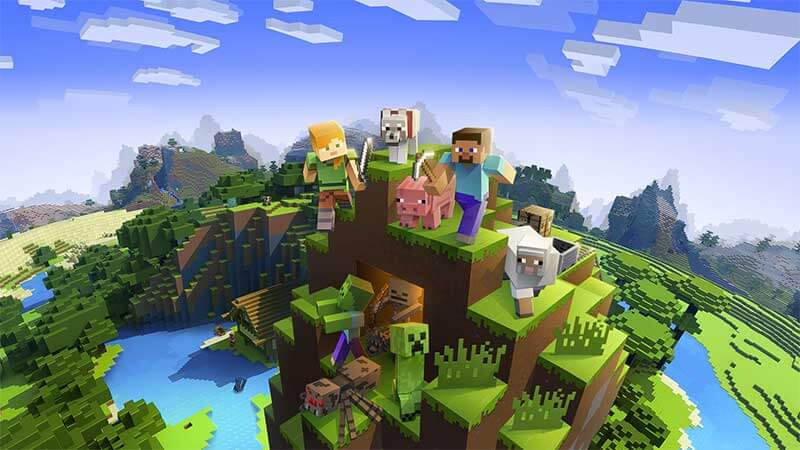
Minecraft drops you into a randomly generated world built entirely of blocks. You punch trees to gather wood, mine stone for tools, build shelters, grow food, and fight hostile creatures called mobs. There's no mandatory storyline and no fixed win condition unless you choose one — that freedom is the entire point. According to Wikipedia, Minecraft is the best-selling video game of all time with over 238 million copies sold across PC, consoles, tablets, and mobile.
The game ships in two main editions: Java Edition (PC only, highly moddable, the original version) and Bedrock Edition (PC, Xbox, PlayStation, Nintendo Switch, iOS, and Android). Both share the same core gameplay, but Java Edition offers deeper customization while Bedrock Edition lets you play across platforms with friends on different devices. Pick based on your hardware and where your friends already play.
Contents
Minecraft Beginner Basics Guide to Pricing: What You Actually Pay
Minecraft is a one-time purchase with no required subscription. You pay once and own it outright. That pricing model is a big reason the game has stayed popular for so long — there's no recurring pressure to spend money just to keep playing.
One-Time Purchase vs. Optional Extras
The base game covers everything you need for solo play and access to public multiplayer servers. The optional Minecraft Realms subscription ($8/month) lets you host a private, always-online server for up to 10 friends with zero technical setup required. It's completely optional — free community servers exist, and you can self-host for free if you're comfortable with basic networking steps.
Here's a full breakdown of what Minecraft costs:
| Item | Price | Required? | Notes |
|---|---|---|---|
| Java Edition (PC) | ~$30 | Yes | Best for mods; PC only |
| Bedrock Edition (PC) | ~$20 | Yes | Cross-platform play with consoles and mobile |
| Console / Mobile | $7–$30 | Yes | Price varies by platform and store |
| Minecraft Realms | ~$8/month | No | Private server for up to 10 players |
| Marketplace DLC | Varies | No | Skins, texture packs, adventure maps |
Choosing the Right Edition
If you play on PC and want access to the massive modding community, Java Edition is the right choice. If you're buying for a younger player on a tablet or want to play with friends who own consoles, go with Bedrock. On PC, the official Minecraft launcher now bundles both Java and Bedrock under a single combined purchase — a solid deal that gives you full flexibility without paying twice.
The Real Pros and Cons of Playing Minecraft
Minecraft isn't perfect for every player. Knowing exactly what you're getting into before you buy helps you get more out of the experience from day one.
What Makes Minecraft Worth Playing
The strengths are real and significant:
- Infinite replayability — every world generates randomly, so no two playthroughs are the same
- Runs on almost every device, including low-end PCs, smartphones, and older consoles
- Beginner-friendly at its core — no reading required to understand the basic loop
- Massive community with tutorials, guides, and free mods for virtually any playstyle
- Appropriate for all ages, with parental control settings built into Bedrock Edition
- Creative Mode removes all constraints and turns the game into a pure building sandbox
- Consistent major updates from the developers — new biomes, mobs, and mechanics keep the game fresh
Where the Game Falls Short
The cons are worth knowing upfront:
- The blocky, retro visual style is deliberate — but it won't appeal to every player
- Survival Mode has a steep early learning curve if you skip beginner resources entirely
- Java Edition can be slow to launch and finicky on lower-end hardware
- Multiplayer servers expose younger players to strangers — parental oversight is recommended
- The in-game tutorial barely scratches the surface; external guides are effectively mandatory to progress
For most players, the pros dominate. Minecraft earns its reputation because its flexibility lets you define exactly what "fun" means — sandbox builder, survival challenge, social hangout, or competitive speedrun.
Rookie Mistakes Every New Player Makes
Every new Minecraft player makes the same predictable mistakes. Knowing them in advance means you skip the frustration and get straight to the fun.
What to Do on Day One
The single most common beginner error is not building shelter before nightfall. When the sun sets, hostile mobs spawn — zombies, skeletons, creepers, and spiders. Without walls and a roof, you're exposed and almost certain to die before morning.
Follow this sequence on day one without deviation:
- Punch trees immediately to collect wood — it's your foundational resource for everything else
- Open your inventory and craft a crafting table using 4 wooden planks arranged in a 2×2 square
- Build wooden tools in order: pickaxe first, then an axe and a sword
- Mine stone to gather cobblestone — the next tier of material for tools and building
- Build a basic four-wall shelter with a door before the sun goes down
- Craft a bed (3 wool + 3 wooden planks) to skip the night once you find sheep
Intermediate Traps to Watch For
Once you've survived the first few nights, these mistakes become the new danger:
- Mining straight down — you'll fall into lava or drop into an open cave with no ladder out
- Ignoring your food bar — hunger depletes continuously, and zero food means health drain
- Standing still near a creeper — they don't attack until they detonate, and the explosion destroys your gear
- Wandering far from your base without a map or coordinates — getting permanently lost is extremely common
- Storing all your best gear in one chest near your furnace — one lava accident ends your run
On Java Edition, press F3 to open the debug screen and see your exact X/Y/Z coordinates. Write down your spawn coordinates the moment you start a new world. This single habit saves hours of searching and prevents one of the most common beginner disasters.
The Many Ways to Experience Minecraft
Minecraft isn't a single game mode — it's a platform with distinct playstyles that suit completely different types of players. Understanding your options makes this minecraft beginner basics guide actionable rather than just theoretical.
Single Player vs. Multiplayer
Single player is the right starting point for most beginners. You play at your own pace, make mistakes without pressure, and learn the mechanics without social anxiety. Once you're comfortable, multiplayer opens up a completely different experience — cooperative mega-builds, player-vs-player arenas, mini-game servers, and community events with thousands of active players.
Bedrock Edition supports cross-platform play between Xbox, PlayStation, Nintendo Switch, PC, and mobile — your friend on a console can join your PC world without workarounds. Java Edition limits multiplayer to PC-to-PC connections only, but its community-run server ecosystem is enormous and highly varied.
Survival Mode vs. Creative Mode
The two core modes every beginner needs to understand:
- Survival Mode — you gather every resource, manage hunger, fight enemies, and progress organically. This is the primary game experience for most players.
- Creative Mode — unlimited resources, flight enabled, no enemies, no health or hunger. Ideal for building and experimenting without consequences.
- Adventure Mode — built for custom community maps with special rules applied. You won't need this as a beginner.
- Hardcore Mode — identical to Survival but with permadeath. When you die, the world is deleted. Strictly not for beginners.
Start in Survival on Easy difficulty. Enemies still spawn but deal reduced damage, giving you breathing room to learn without dying constantly. Switch to Creative freely whenever you want to test a design or experiment with a build before committing real resources.
Keeping Your Game and Setup Running Smoothly
Minecraft is deceptively demanding on hardware, especially on PC. Staying ahead of performance and file management issues keeps your sessions smooth and your progress protected.
Protecting Your World Files
Java Edition saves your worlds locally with no automatic cloud backup. Back them up manually before major game updates, before installing any mods, and periodically during large builds. On Windows, world saves live at %appdata%\.minecraft\saves. Copy that entire folder to an external drive or cloud storage on a regular schedule. Losing weeks of work to a corrupted file is entirely preventable — it takes five minutes and requires no technical skill.
PC Performance Tips
Java Edition allocates only 2GB of RAM by default, which causes stuttering during world generation and chunk loading on almost every system. Increase the allocation to 4–6GB in the launcher under Installations → Edit → More Options → JVM Arguments. Our guide on how much RAM you need for gaming explains what your system can safely give up.
Installing Minecraft on an SSD rather than an HDD eliminates most chunk-loading stutters and cuts world load times significantly. Long Minecraft sessions keep your CPU running hard — check our article on optimal CPU and GPU temperatures for gaming to know when your hardware is running too hot. And if you play for hours at a stretch, your seating matters more than you'd expect — our comparison of DXRacer vs AKRacing gaming chairs gives you honest, practical recommendations.
When Things Go Wrong: Minecraft Fixes That Actually Work
Every player eventually hits a technical wall. Here are the most common problems and exactly how to fix them.
Solving Performance and Lag
In-game lag in Minecraft almost always traces back to one of three causes: insufficient RAM allocation, render distance set too high, or an outdated graphics driver. Work through them in order:
- Reduce render distance to 8–10 chunks in Video Settings — the default of 12 is manageable, but max settings (32 chunks) will bring most mid-range PCs to a crawl
- Increase RAM allocation to 4–6GB in launcher settings
- Update your GPU driver directly from NVIDIA, AMD, or Intel's website
- Install OptiFine (free Java Edition mod) — it consistently doubles frame rates on mid-range hardware with no visual downgrade
- Close background applications — a browser with dozens of tabs open competes directly with Minecraft for RAM
If you're unsure whether your PC hardware is the root cause of lag, our guide comparing Intel i5 vs i7 processors for gaming clarifies what CPU tier handles Minecraft comfortably. For the best visual output from the game, our breakdown of IPS vs TN vs VA monitor panels explains which display technology renders Minecraft's color palette most accurately.
Crashes and World Corruption
If Minecraft crashes on launch, work through these fixes in sequence:
- Reinstall or update your Java installation — Java Edition requires Java to run and outdated versions cause silent failures
- Disable installed mods one at a time to identify the conflicting one — mod conflicts are the most common crash cause by far
- Use the launcher's built-in repair or reinstall option to replace corrupted game files
- Update your graphics driver if the crash happens at the title screen or during world loading
For a world that crashes every time you load it, navigate to the world's folder inside your saves directory. Delete the current level.dat file, then rename level.dat_old to level.dat. This rolls back to the previous save state and recovers corrupted worlds the majority of the time. It takes under a minute to attempt and costs you nothing if it doesn't work.
Minecraft rewards curiosity — the more you explore, experiment, and yes, fail, the faster you go from overwhelmed newcomer to confident builder.


About Mike Jones
Mike Jones grew up in the golden age of arcade and home gaming — a childhood shaped by Atari classics like Pitfall, Frogger, and Kaboom that gave him a lifelong appreciation for games of all kinds. These days he covers the full breadth of tabletop and family gaming: board games, card games, yard games, table games, and game room setup, with a particular focus on finding the games that bring different groups together. At GamingWeekender, he covers game reviews, buying guides, and recommendations for families, friends, and hobbyists who take their leisure seriously.
You can get FREE Gifts. Or latest Free phones here.
Disable Ad block to reveal all the info. Once done, hit a button below